Reporting Test
The Reporting Test page enables you to view the previously performed reporting test reports and raise a reporting test request. The reporting test ensures that the alarm from each sensor is accurately reported to the Central Station.
The Reporting Test page lists the reporting test report, along with the following details:
-
Performed On: Displays the date and time when the reporting test was performed.
-
Name: Displays the name of the reporting test.
-
Notes: Displays any notes entered during the reporting test.
-
Status: Displays the status of the reporting test.
-
Performed By: Displays the name of the user who performed the reporting test.
-
Details: Displays the detailed information of the previously performed reporting test.
Performing a New Reporting Test
The New Reporting Test option enables you to start and stop a new reporting test.
To start and stop a new reporting test:
-
In the AlarmNet home page, type the City-CS-Sub or the MAC ID of the device and then click Search.
The account number, along with the device details, appears.
-
Under Actions, select Edit and then click the  icon. The Account Overview page appears.
-
In the left pane, click Reporting Test. The Reporting Test page appears.
-
Click New Reporting Test. The Alarm Report Test dialog box appears.
-
You must ensure the following:
-
That you have armed the panel before you begin the reporting test.
-
That you have intimated the Central Station about the reporting test and then select I have informed the Central Station.
-
Click Start Test.
|

|
Notes:
-
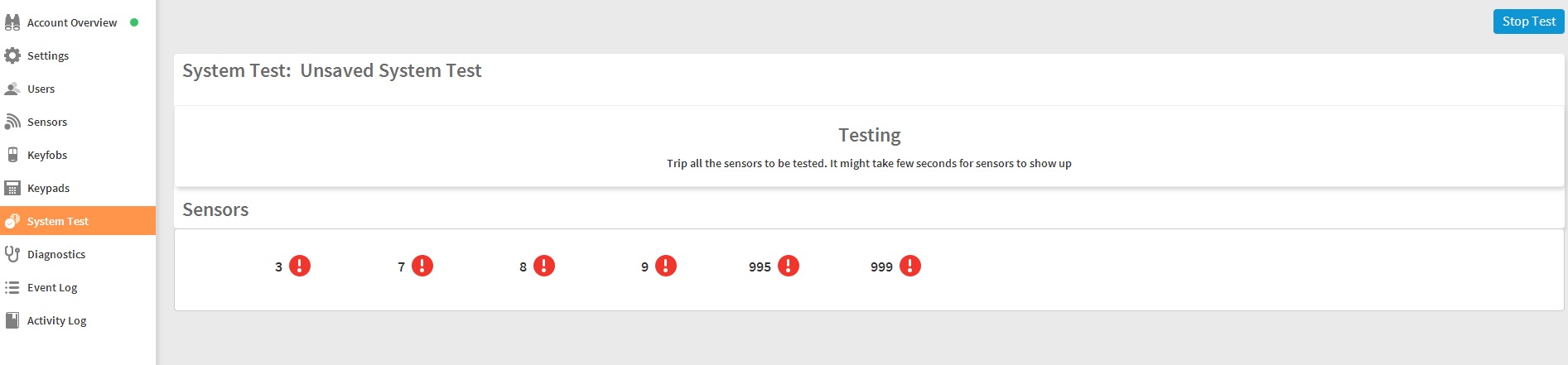
The Sensors pane lists the sensors in red  , along with the zone number to which the sensor is configured. The red color indicates that the alarm has not reached the Central Station. , along with the zone number to which the sensor is configured. The red color indicates that the alarm has not reached the Central Station.
-
You can also click the icon to view the sensor details.
|
-
Based on your requirement, trip the configured sensors. The corresponding sensors turn green  , indicating that the alarm has reached the Central Station.
-
Click Stop Test.
-
Type a Name for the reporting test.
In the Notes field, you can also type more information about the reporting test that was executed.
-
Click Done. In the Alarm Report Test Saved dialog box, select I have informed the Central Station.
-
Click Finish.
Deleting a Reporting Test Report
With the relevant access permission, you can delete the existing reporting test report.
To delete a reporting test:
-
From the Reporting Test list, click the  icon against the reporting test report.
A warning message appears.
-
Click Yes to confirm the deletion.